
The UK government is testing the Emergency Alerts system on Sunday 7 September 2025 at 3pm.
Your mobile phone or tablet will vibrate and make a loud siren-like sound, even if it’s set on silent. The alert message will confirm this is a test and that you do not need to take any further action.
Regular testing ensures the system is functioning correctly, should it need to be used in a life-threatening emergency. Find out more at gov.uk/alerts.
You can opt out of the Emergency Alerts, including the national test, but you should keep them switched on for your own safety.
Emergency Alerts will warn you via your mobile or tablet if there's a life-threatening emergency nearby. Only the government and the emergency services are able to send them.
There are simple and effective steps we can all take to be more prepared for an emergency.
Visit gov.uk/prepare for advice on how you can prepare.
For more awareness assets including easy read versions of the information please visit Emergency Alerts Campaign Resources - Prepare
If you need your phone to stay hidden for personal safety reason
Some people, for example people who are experiencing domestic abuse, may have a hidden phone for a personal safety reason. If that is the case the way to turn off the notifications is below.
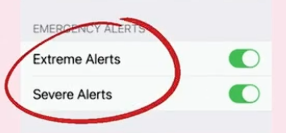
iPhones - click on 'settings' on your home screen. Go to 'notifications' - scroll right to the bottom and you'll find the 'emergency alerts' section. You can toggle off the alerts here, press on the green section until it goes grey
. 
Android phones - go to 'settings' and in the search bar, look up 'emergency alerts' - you can toggle the settings to turn this off.
For anyone in this position, the free National Domestic Abuse Helpline is available 24 hours a day, all-year-round on: 0808 2000 247